PR FAQ: Pencel is the AI command center for running your day-to-day business operations
Bo Wang, Founder and CEO
Press Release
While most AI tools focus on conversations or coding, Pencel focuses on running the day-to-day business. It brings your business context, tools, workflows, and AI colleagues into one command center under your business control and governance. Pencel automates routine work and surfaces what needs your attention. Built for business users and individual professionals, Pencel turns domain knowledge and desired outcomes into repeatable AI-powered operations with no technical expertise required. Our mission is to level the playing field: give every founder, expert, and small business the AI and operational capabilities once available only to large companies, so a small team with great ideas can think bigger, move faster, and compete at any scale.
TL;DR
- What it is. A desktop command center where you and AI colleagues run business operations together. Each recurring job lives in a Room, similar to a Slack channel for a business process. Pencel gathers the relevant context, performs work, keeps you updated, and surfaces decisions that need your attention.
- Who it's for. Founders, consultants, operators, and small businesses where the people running the company are still deeply involved in day-to-day operations and routine back-office work.
- What you can run. Start with ready-to-use rooms for workflows such as RFP drafting, email triage, and accounting operations. When you need something specific, Pencel Studio lets you create and manage your own agents and workflows simply by describing the business outcome you want.
- How you work. Instead of jumping between AI chats, apps, automation tools, and repetitive tasks, Pencel does more of the routine work for you and brings the important decisions to one place, giving you back your most precious resource: time, and the ability to scale your business.
- Why it's different. Chatbots help you think. Coding agents help developers build software. Pencel helps business operators run their day-to-day business.
- Where it is. Pencel is available for Mac and Windows. Download Pencel.
SEATTLE, September 25, 2026. Pencel today publicly launched its AI command center for people who run small businesses and do much of the routine manual work themselves. While the latest AI agents are becoming increasingly powerful, most small businesses do not have dedicated AI teams, sophisticated IT infrastructure, or the time to keep up with a rapidly changing landscape of AI models, tools, integrations, and agent frameworks. Pencel is built on a simple belief: business owners should focus on their customers, their expertise, and the decisions that make their businesses unique, not waste their precious time learning how to configure an agent's technical details. Users just describe the outcome they want in their own words, and Pencel works out how to accomplish it within the context of their business, connecting the right tools, workflows, and AI capabilities while keeping appropriate governance and human control in place. The goal is to make powerful agentic technology accessible to every business, so small teams and eventually even one-person companies can operate with capabilities once available only to much larger and more sophisticated organizations, while keeping their knowledge, judgment, and competitive advantage in their own hands.
The Problem
AI is getting smarter every day, but it still does not truly understand how your business works. Your knowledge is scattered across Gmail, QuickBooks, Slack, spreadsheets, documents, and processes that may exist only in someone's head. The person responsible for the outcome is often also the person copying numbers between tabs, chasing information across systems, and manually piecing together what is happening. Countless hours are lost to routine work, while important patterns and business signals remain hidden across disconnected tools.
Most businesses still use AI primarily as a chatbot, but the bigger opportunity begins when AI becomes part of the operation itself. Instead of waiting for someone to ask a question, AI should be able to understand the context of the business, monitor what is happening, and proactively perform routine work. It should scout incoming RFPs, triage the inbox, reconcile receipts, prepare reports, detect unusual changes, and bring the right issue to the right person at the right moment. AI agents should also be governed and observed the way they would be in an enterprise environment. Agents should not work in silos, and teams should be able to share agents with each other in a collaborative workspace. This is the shift from AI as a tool you talk to toward AI as an operating layer, or AI brain, for the business.
Small businesses are especially underserved because they lack dedicated IT teams or AI engineers who can connect their systems, automate their processes, and continuously adapt new technical capabilities to the way their company actually works. Forward-deployed engineers can reduce the severity of the problem, but they are expensive, often lack deep business context, and require companies to share business secrets that often represent their competitive advantage. Agentic AI changes that equation. For the first time, it can become technically and economically possible to give every small business customized software that adapts to how they actually operate, rather than forcing the business to adapt to the software.
The Command Center
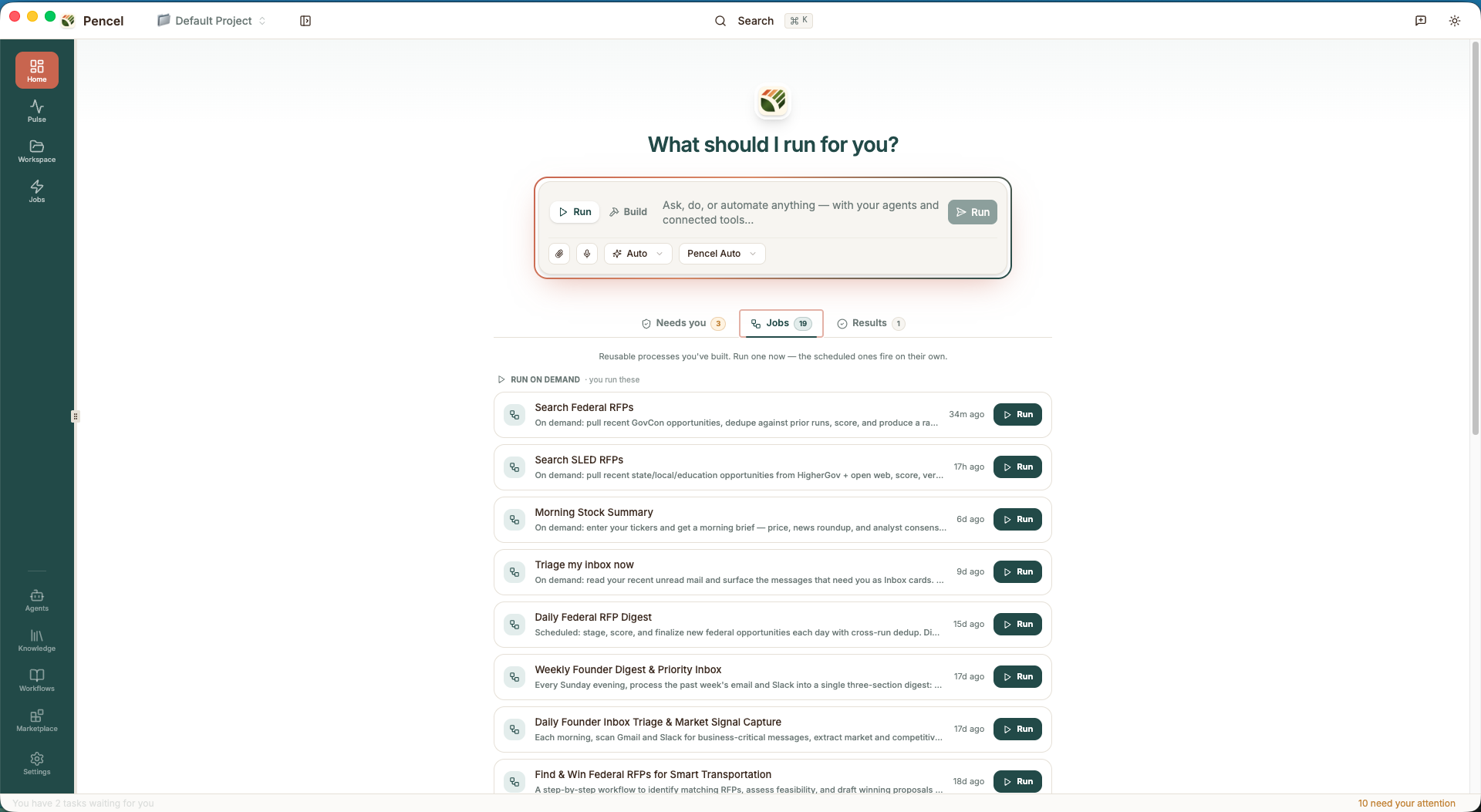
You open Pencel every morning to get a quick glance at the important things you need to know. Agents have reviewed your inbox, calendar, tasks, business signals, and competitive news, then prioritized what matters most in cards ranked by importance, tailored to your preferences and business context.
Home presents the important items as action cards. A proposal is ready for review. Three emails need your approval. A customer payment is overdue. A new RFP needs a pursue or pass decision. Each card tells you what happened, why it matters, and what you can do next, such as approve, edit, send, delegate, or dismiss. You can always stay on top of the things that matter to you without worrying about missing messages.
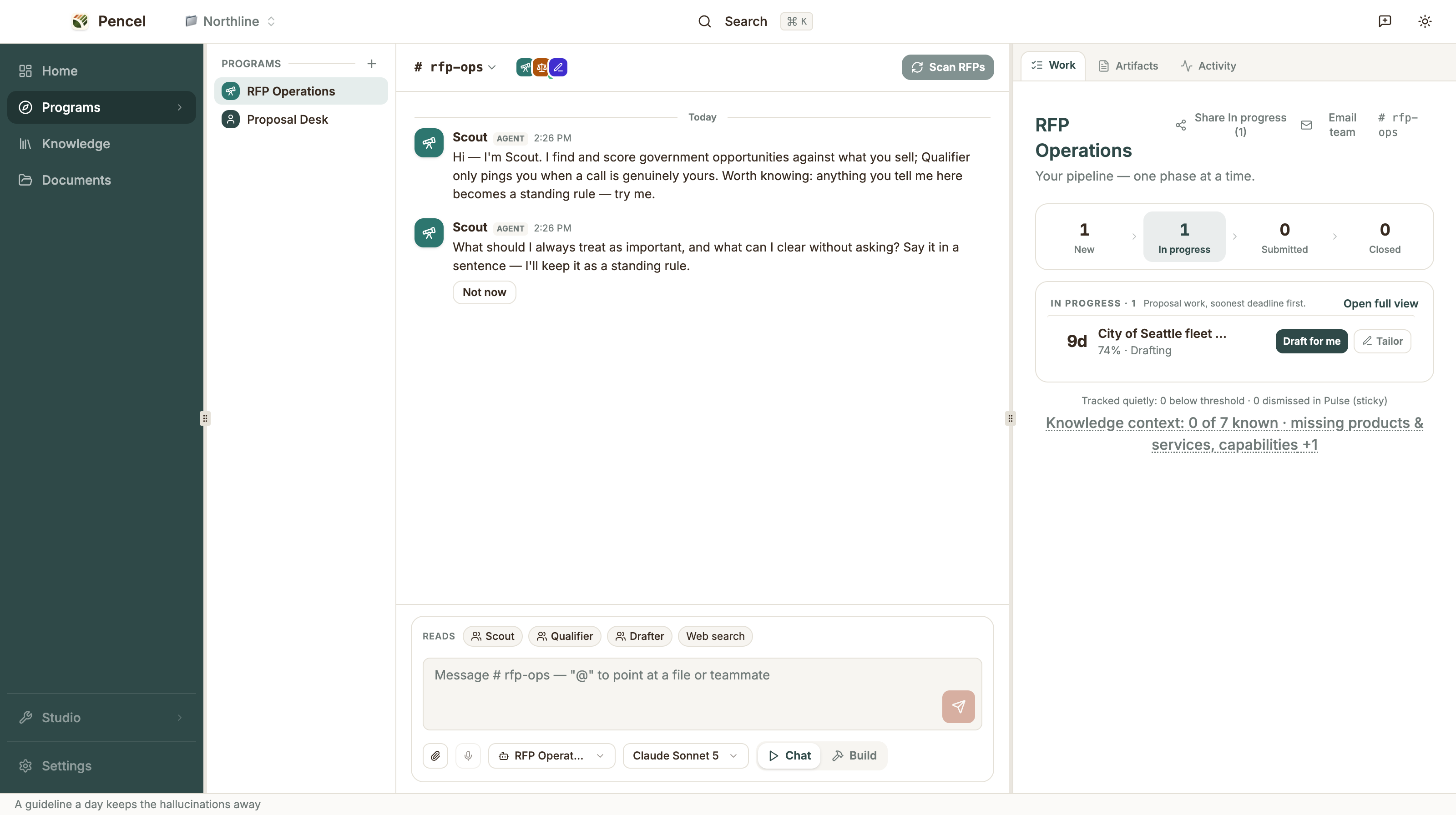
Agent Room as Collaboration Space with Agent Colleagues
Team lists your AI colleagues, and each one has a room where you work with it. Every recurring operation lives in a room, a shared workspace similar to a Slack channel where you, your human teammates, and AI colleagues work together to get things done. You can install a ready-to-use room or simply describe the outcome you want. Inside the room, you can create specialized agents with no code, connect business tools, and build persistent knowledge about your company, customers, processes, and preferences. That context stays with the room, so both people and agents get smarter about the work over time.
Your AI colleagues do more than wait for instructions. They can proactively plan the work, monitor what is changing, triage incoming tasks, collaborate with other agents, and surface the decisions that need human judgment. A proposal room can find opportunities, qualify them, and prepare drafts. An inbox room can prioritize messages and prepare replies. A finance room can watch the books in your email inbox and flag exceptions. Humans provide the judgment and domain expertise. Agents provide the capacity to keep the work moving. The result is a workspace where humans and agents can collaborate safely, and the company controls who can access which agents and Rooms, much like adding colleagues to a Slack channel.
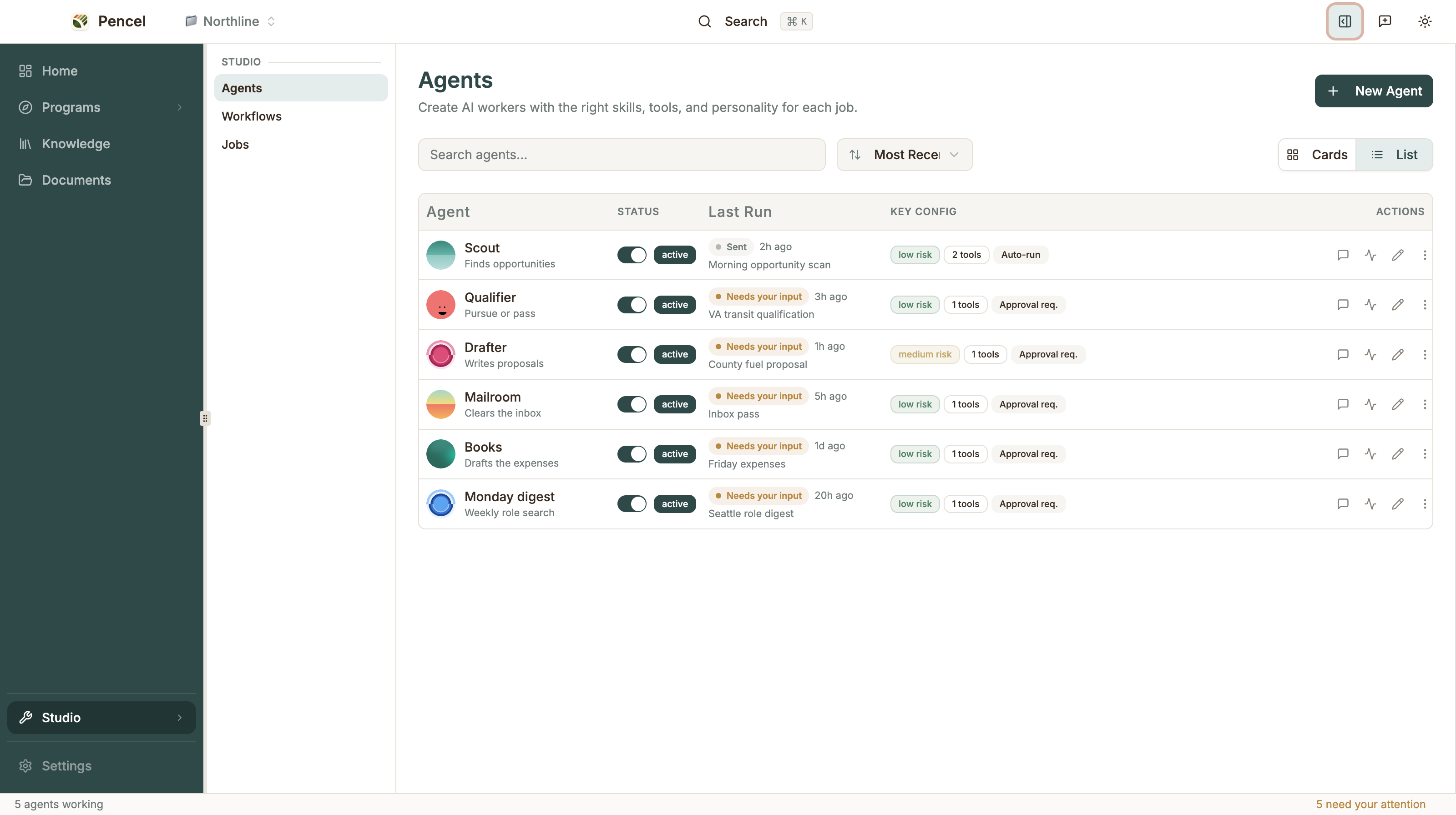
Agent Studio, for Deeper Control When You Need It
For users who want more control, Studio lets you shape each agent around its purpose, responsibilities, behavior, company knowledge, tools, and permissions. Instead of asking business users to understand agent frameworks, skills, or orchestration, Pencel constructs the underlying agent setup using proven practices, while users stay focused on the business outcome they want to achieve.
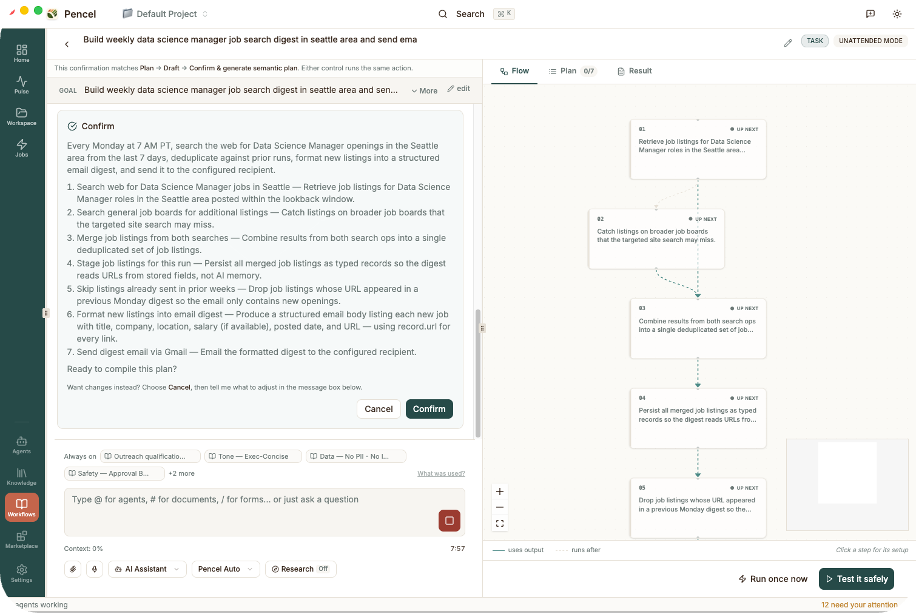
Pencel goes beyond giving an agent a text-based plan and hoping it follows the instructions. It translates the desired outcome into an explicit workflow graph, where each node represents a step, decision, agent, tool, or human approval. This gives businesses greater visibility and control over how work is executed. Simply describe an outcome such as, "Every morning at 8 am, find accounting expenses in my inbox and prepare them in QuickBooks." Pencel determines the steps, systems, agents, dependencies, and approval points required to achieve that outcome, then presents the workflow for you to inspect and refine.
Every execution creates a transparent job log showing what information the agents accessed, what steps ran, what actions were taken, where human judgment was requested, and what was produced. This gives teams the governance and visibility needed to trust AI with increasingly important business operations. You define the outcome, knowledge, and boundaries. Pencel turns them into a controlled process that agents can reliably execute while keeping you in control.
Documents That Are Part of the Operation
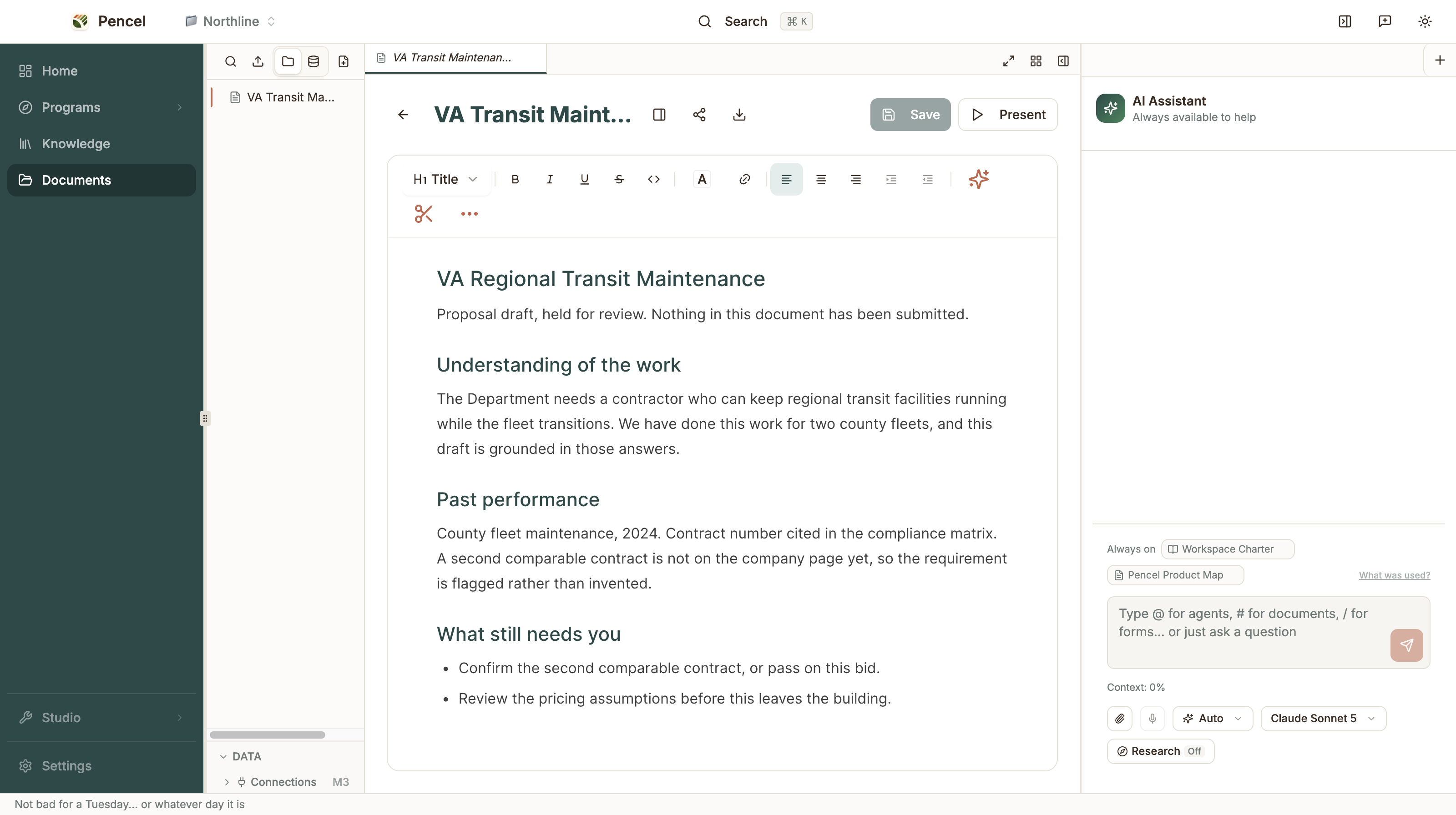
Proposals, reports, spreadsheets, and presentations live alongside the Rooms where the work happens. A document is not simply an output that gets exported and forgotten in a folder. You can review it, edit it in place, ask agents to revise it, and keep the supporting context and decisions attached to the work.
As people and agents collaborate, these documents become part of the company's persistent knowledge. When you approve a proposal answer, correct a number, or explain why a decision was made, Pencel can carry that knowledge forward. The next time an agent prepares similar work, it can build on what the business has already learned instead of starting from scratch.
Knowledge Management That Continuously Learns How Your Business Works
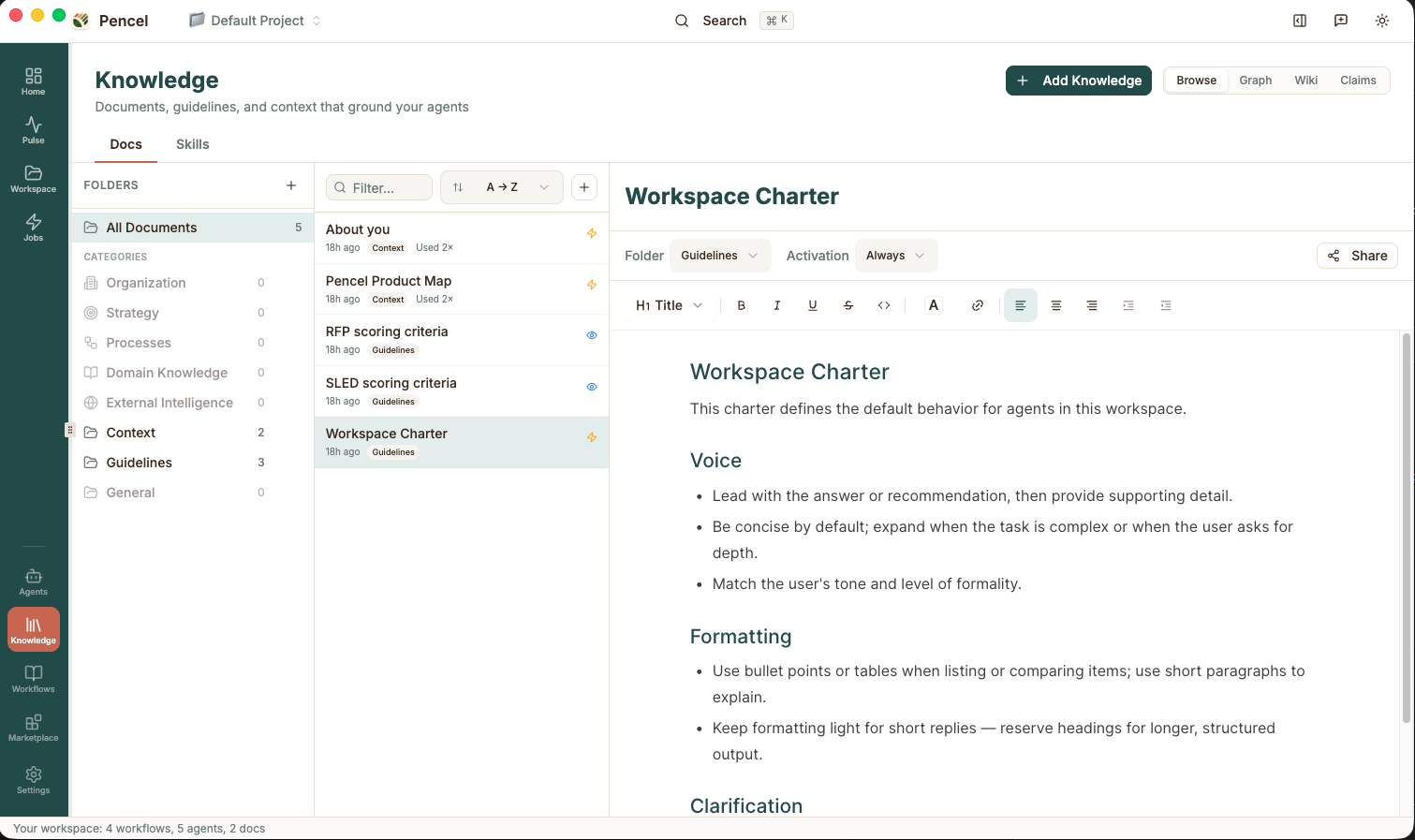
As people and agents collaborate, Pencel continuously builds a living state of operation for the company: what has happened, what is in progress, what decisions were made, what knowledge was learned, and what still requires attention. This operational knowledge can be shared across people and agents with explicit access controls, so each teammate, agent, and Room sees only the information it is allowed to use.
Knowledge is also something the business actively manages, not just something agents remember. Company facts, procedures, guidelines, and reference documents live in one Knowledge workspace, where people can review what agents have learned, correct it, and confirm what becomes the company's official version. Each team and company decides which knowledge stays with one person, which is shared with a team or Room, and which applies across the whole company, as well as who can edit it and which agents can use it. Update a fact once, and every teammate and agent that relies on it works from the new version. Over time, Pencel becomes not just a place where work gets done, but a governed memory of how the business actually operates.
A Company That Learns and Operates Together
Pencel is an outcome-driven product, built on the idea that using AI should be as easy as using an iPad, if not easier. Business users describe what they want to accomplish, and agents help plan, execute, and improve the operation around that goal. Instead of waiting for someone to ask a question, Pencel continuously watches the day-to-day business, looks for important signals, prepares work, and brings forward the decisions that require human judgment.
More importantly, Pencel is designed for the next generation of AI-native companies and super individuals. People and agents work together inside shared Rooms, grounded in the same company knowledge and operating context. The business decides what each person and agent can see, which systems they can access, what actions they can take, and where human approval is required. Knowledge can be shared at the team or company level while remaining governed by access controls. Decisions, documents, workflows, and lessons learned become part of a living state of the operation, reducing the cost of repeatedly finding context, explaining decisions, and aligning the organization.
Over time, this creates something larger than a collection of AI agents. It creates a company that can remember, learn, coordinate, and act as one system. "I believe every company will eventually have an AI brain or AI operating system that grows with the business, understands how it operates, and helps people and agents work together as one living organization," said Bo Wang, founder and CEO of Pencel. "That capability should not belong only to the largest companies with enormous technology teams. Our goal is to put it in the hands of every founder and small business, so a small team with deep knowledge and great ideas can operate with the intelligence, speed, and scale to compete with companies many times its size."
Getting Started
Download Pencel for Mac or Windows at pencel.ai/download.
If you run a business and want a room built around a real operation, join the design-partner program. Partners get hands-on setup and a direct line to the roadmap. Contact bo@pencel.ai.
Frequently Asked Questions
What makes Pencel different from existing agent platforms?
Pencel is built around several ideas.
Outcomes instead of prompts. You describe what the business needs to accomplish, and Pencel helps construct the operation required to achieve it.
Proactive operations instead of passive conversation. Agents can monitor what is happening, look for business signals, and prepare work before someone asks.
Humans and agents working together. Rooms provide a shared environment where people and AI colleagues can coordinate around the same operation.
Company knowledge instead of isolated chat history. Knowledge accumulates across work and can be shared with the people and agents that need it.
Governance from the beginning. The company controls knowledge access, agent permissions, approval points, and operating boundaries.
Work that becomes memory. Documents, decisions, corrections, workflows, and operating history become part of a growing model of how the company works.
Who is Pencel for?
Pencel is built for people who both run the business and do the work. That includes founders, consultants, independent professionals, operators, and small teams.
You should not need to become an AI engineer to benefit from AI agents. Pencel lets you stay focused on your business knowledge, customers, and decisions while it handles much of the technical complexity underneath. Rooms, agents, and knowledge can also be shared across a team, so Pencel grows from a personal command center into a company operating environment.
Which use cases can I do with Pencel today?
RFP operations. Pencel can monitor relevant opportunities, score them against your business, prepare pursue or pass recommendations, build a compliance matrix, and draft a proposal for your review.
Email operations. Connect Gmail and let Mailroom triage the inbox, identify what actually needs your attention, and prepare replies for you to review and send.
Finance operations. Connect QuickBooks, review information from your live books, identify expenses from incoming documents and email, and prepare transactions for approval.
Custom operations. In Studio, describe an outcome unique to your business. Pencel can turn it into a workflow that you can review, run, schedule, improve, and share with your team.
How does Pencel understand my business?
Pencel learns from the information your business already uses, including company facts, documents, operating procedures, qualification rules, customer context, past work, pricing, decisions, and the corrections people make while working with agents.
As work happens, Pencel builds a living state of the operation. It understands what has happened, what is currently in progress, what decisions were made, what the company has learned, and what still requires attention.
The goal is not simply to store more documents. It is to gradually build an operational model of how your company actually works.
How is company knowledge shared safely?
Knowledge in Pencel can be shared at the individual, team, Room, or company level. (Upcoming feature)
The business controls which people and agents can access which knowledge, systems, and operations. An agent working on finance does not automatically need access to everything another agent knows about sales. A teammate only sees the Rooms and knowledge they have permission to use.
This lets companies share context without sharing everything with everyone, reducing the cost of repeatedly explaining the business while maintaining clear boundaries around sensitive information.
Is Pencel only for individual productivity?
No. Pencel can start with one person, but it is designed to become a shared operating environment for a team.
Agents, Rooms, workflows, documents, and company knowledge can be shared with colleagues while access controls determine who and what can use each resource.
The larger vision is to help a company operate as one learning system, where people and agents share context and continuously improve how work gets done.
How much does Pencel cost?
You can start with Pencel for free. The free plan includes the full local desktop experience and lets you connect your own AI model API keys, giving you control over which models you use and what you spend.
Paid plans include AI credits, so there are no API keys to manage: Solo for building your own agents, and Pro with more credits to run our pre-built agents every day. For companies, our Enterprise plan has us build, run and maintain custom agents for your team. Our goal is simple: let anyone start building AI-powered operations without a large upfront software or IT investment, then scale Pencel with the business.
See the latest plans and pricing at pencel.ai/pricing.
How do I get started?
Download Pencel. Pencel is available for Mac and Windows at pencel.ai/download. You can see plan options at pencel.ai/pricing.
Become a design partner. If your company has a recurring operation you want Pencel to help run, contact partners@pencel.ai. Design partners work directly with the Pencel team to apply the product to real business operations and help shape what we build.
Talk with us about Pencel. Investors and others interested in the vision for an AI command center for business operations can reach Bo Wang at bo@pencel.ai.